# Fail2Ban UI
**Enterprise-Grade Intrusion Detection System Management Platform**
[](https://www.gnu.org/licenses/gpl-3.0)
[](https://golang.org/)
[](https://www.linux.org/)
*Swiss-made open-source solution for centralized Fail2Ban management across distributed infrastructure*
[Features](#-features) • [Quick Start](#-quick-start) • [Documentation](#-documentation) • [Screenshots](#-screenshots) • [Security Notes](#-security-notes)
---
## 🎯 Overview
**Fail2Ban UI** is a production-ready, enterprise-grade web-based management platform to create a distributed Fail2Ban intrusion detection system. Designed for organizations managing single or multible fail2ban instances. It provides centralized ban-control, real-time monitoring and alerting across all servers.
### Why we Need Fail2Ban UI
Modern enterprises face increasing security challenges with generally distributed infrastructure, cloud deployments, and multi-location operations. Traditional Fail2Ban management requires a manual SSH access to individual servers, manual configuration changes, and lacks centralized visibility. **Fail2Ban UI solves these challenges** by providing:
- **Centralized Management**: Control multible Fail2Ban instances from a single interface
- **Real-Time Visibility**: Monitor ban / security events across your entire proxy / webserver infrastructure (also planned to ingest all via connector to SIEM)
- **Operational Efficiency**: Reduce administrative overhead with automated workflows e.g. auto-banning for recurring IPs, directly on the firewall.
**Developed by [Swissmakers GmbH](https://swissmakers.ch)** — Trusted by enterprises swisswide for mission-critical security infrastructure.
---
## 🚀 Current Features
### 🏢 Multi-Server Management
**Centralized Control Across Distributed Fail2Ban Instances**
- **Unified Dashboard**: Monitor and manage multiple Fail2Ban servers from a single interface
- **Flexible Connectivity**: Support for local, SSH, and API agent connections form Fail2Ban-UI to other Fail2Ban Instances
- **Connection Testing**: Validate backend connectivity before activate them on the management UI
**Use Cases:**
- Multi-datacenter deployments with several reverse proxies
- Hybrid cloud environments
- Also integrate external Webservers
### 📊 Real-Time Security Intelligence
**Malicious Actor Visibility and Analytics**
- **Live Event Monitoring**: Real-time ban events from all configured / connected servers
- **Historical Analysis**: SQLite-based event storage with advanced querying
- **Geographic Intelligence**: Country-based threat analysis and visualization (Will be later send to SIEM - planned)
- **Recurring Threat Detection**: Identify persistent attackers across time windows
- **Ban Insights Dashboard**: Aggregated statistics
- **Event Correlation**: Track attack patterns across multiple servers and jails (planned with Elasticsearch)
**Business Value:**
- Faster threat response times
- Proactive security posture management
- Compliance reporting and audit trails
### 🛡️ Advanced Ban Management
**IP Blocking and Unblocking**
- **Cross-Jail Search**: Find banned IPs across all active jails instantly
- **Bulk Operations**: Manage multiple bans simultaneously
- **Ban History**: Complete audit trail with timestamps, ban-reasons, and context like whois information of the attacker
- **Whitelist Management**: Configure trusted IPs and networks
- **Automatic Unban**: Time-based ban expiration with configurable policies
- **Permanent Ban for Reccuring IPs**: Set a threshold in the Settings, after what amount of Bans a IP is automatically banned permanently on Firewall (Currently Supported Mikrotik/PFSense)
### ⚙️ Configuration Management
- **Remote Configuration**: Edit Fail2Ban jail and filter configurations remotely
- **Jail Management**: Enable/disable jails across multiple servers
- **Filter Testing**: Debug and validate filters using `fail2ban-regex` before enabeling
- **Template Management**: Standardize configurations across server groups (planned)
### 📧 Alerting
**Security Notifications**
- **Multi-Language Email Alerts**: Localized notifications in currently 5 supported languages
- **Country-Based Filtering**: Alert only on threats from specific geographic regions to reduce alert fatigue
- **SMTP Integration**: Support M365 Mail-Servers with STARTTLS
- **Emai Templates**: Currentls features a Modern and classic email design (more to come)
- **Alert Aggregation**: This feature is planned for the SIEM-modul
### 🔐 Enterprise Security
**Hardened for Production Environments**
- **SELinux Support**: Full compatibility with SELinux-enabled systems and pre-created custom policies
- **Container Security**: Secure containerized deployment with proper best-practisies
- **Least Privilege**: Only minimal permissions are used using FACLs and special sudo-rules
- **Audit Logging**: Comprehensive logging for compliance and forensics also in the future planned to ingest into a Elastic SIEM
- **Encrypted Communications Only**: Secure data transmission for all remote operations will be enforced
### 🌐 Internationalization
- **Multi-Language UI**: English, German (DE/CH), French, Italian, Spanish
- **Localized Content**: All user-facing content translated
- **RTL Support Ready**: Architecture supports right-to-left languages
- **Easy Extension**: Simple JSON-based translation system
### 📱 Modern User Experience
- **Responsive Design**: Full functionality also on mobile devices
- **Progressive Web App**: Works also in a no-internet / offline and restricted environment with local CSS/JS builds only
- **Fast Performance**: Go-based backend with minimal resource footprint
---
## 📸 Screenshots
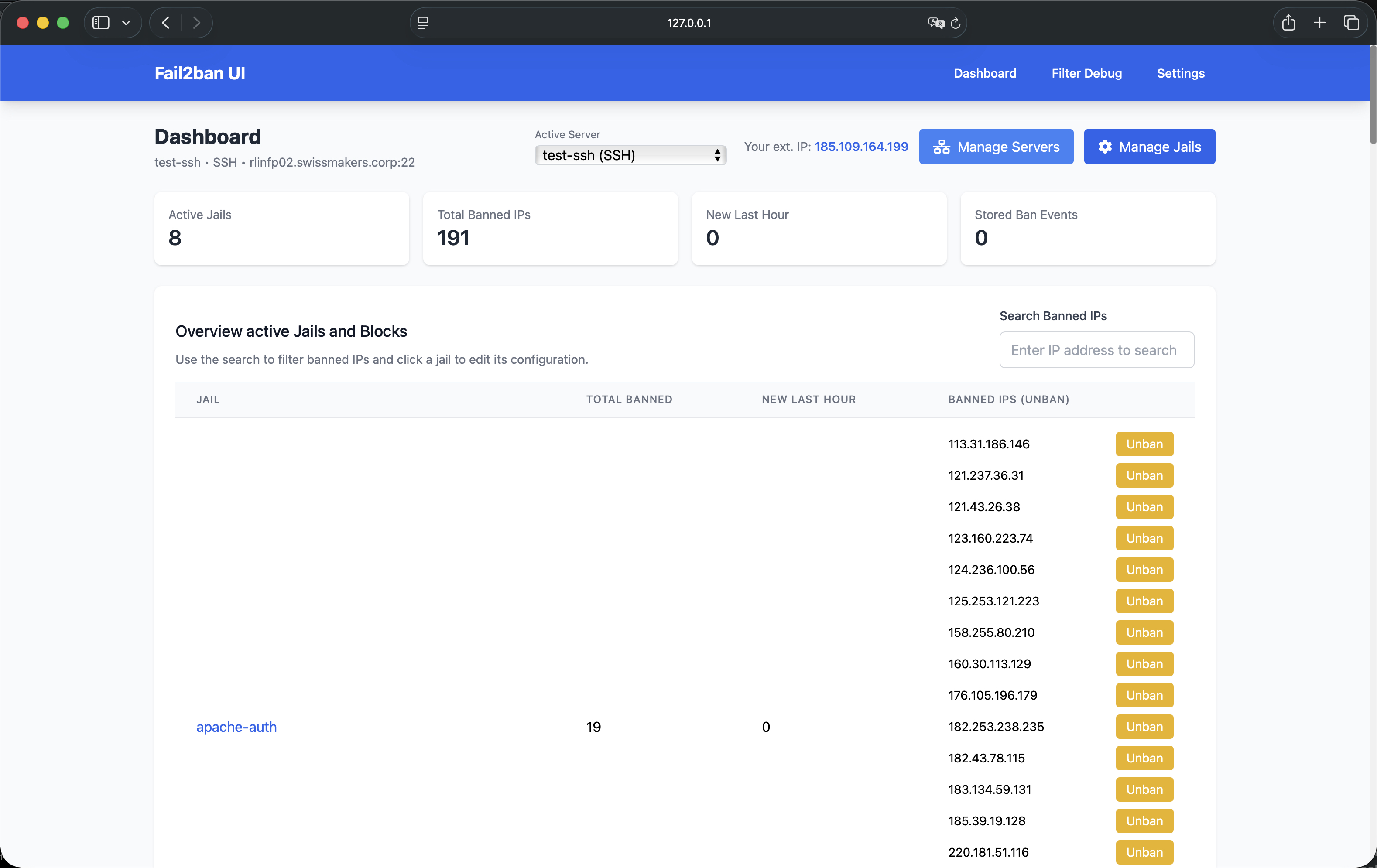
### Dashboard Overview
The central command center for monitoring all Fail2Ban instances and security events.
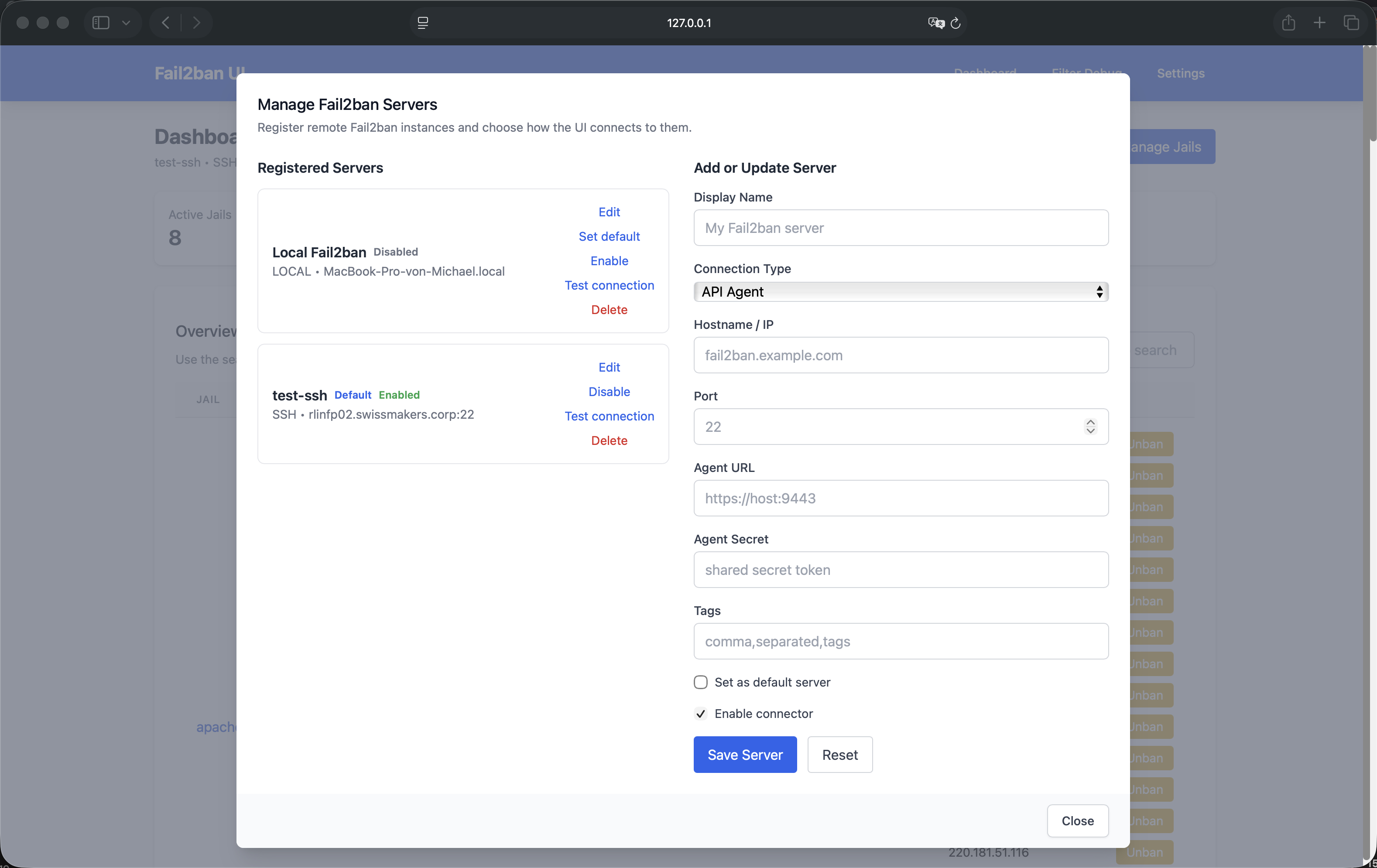
### Server Management
Add, configure, and manage multiple Fail2Ban servers from the "Manage Servers" modal.
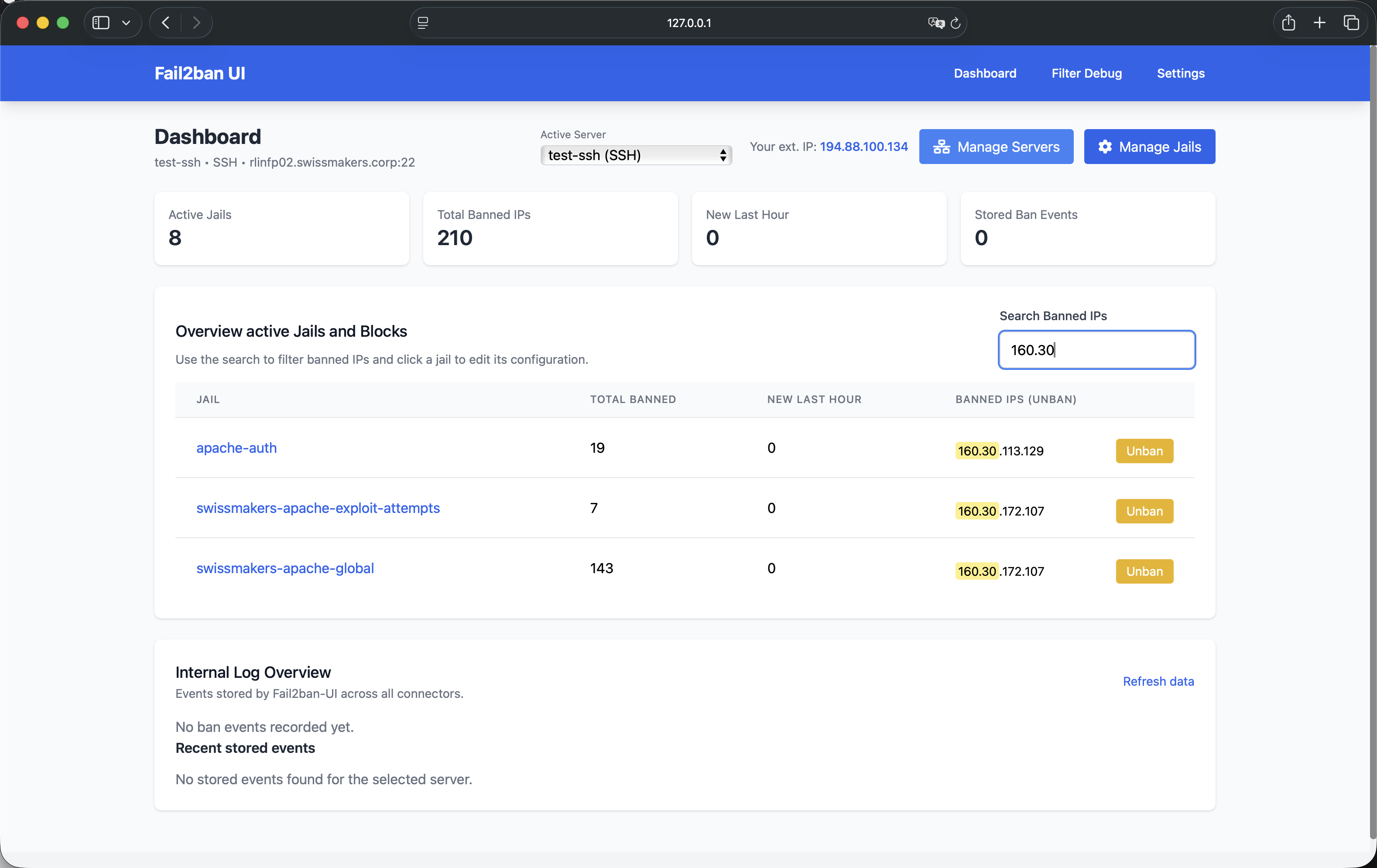
### IP Search and Management
Quickly locate and review / manage banned IPs across all jails and servers.
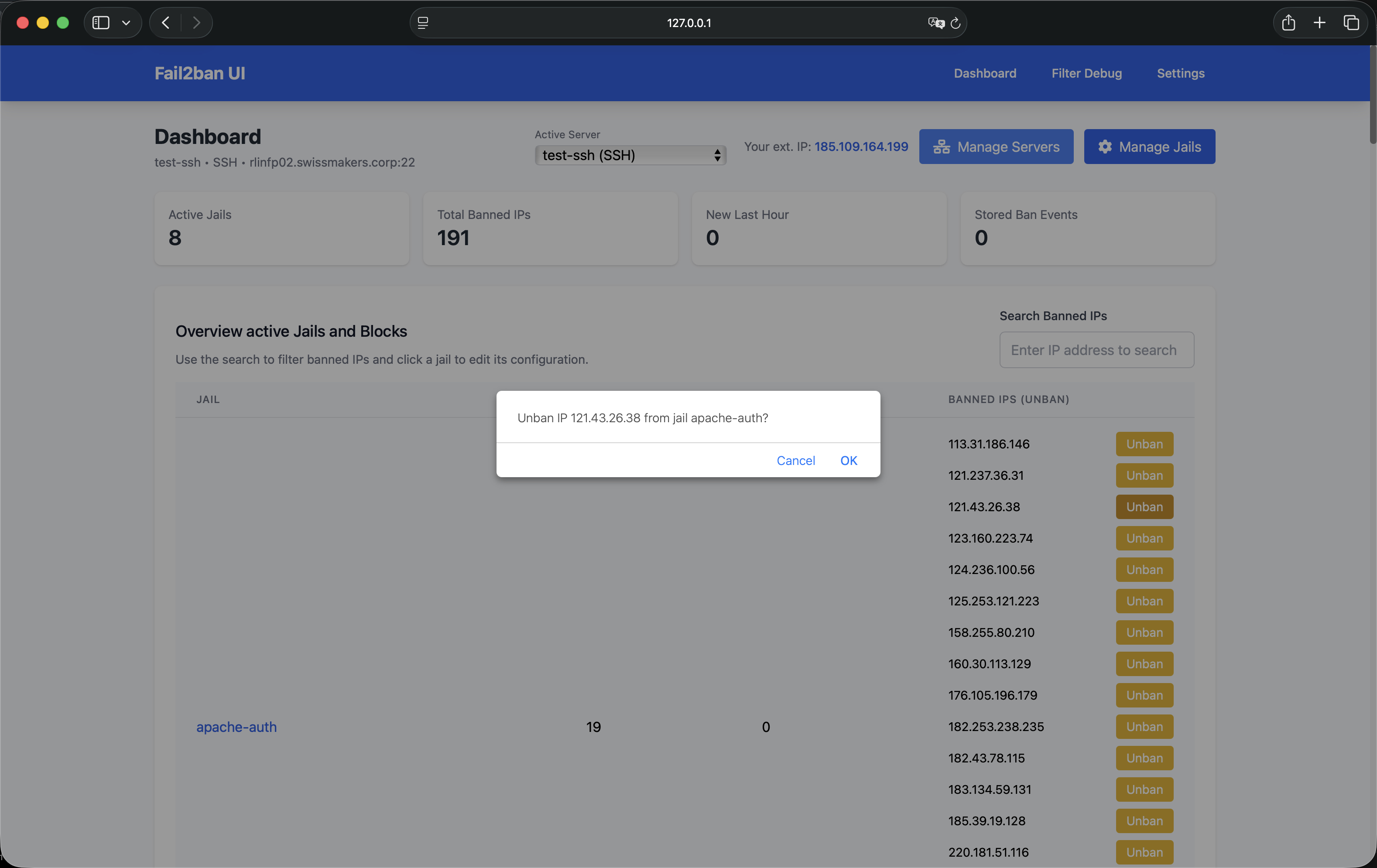
### Unban Operations
One-click unban action with confirmation dialog.
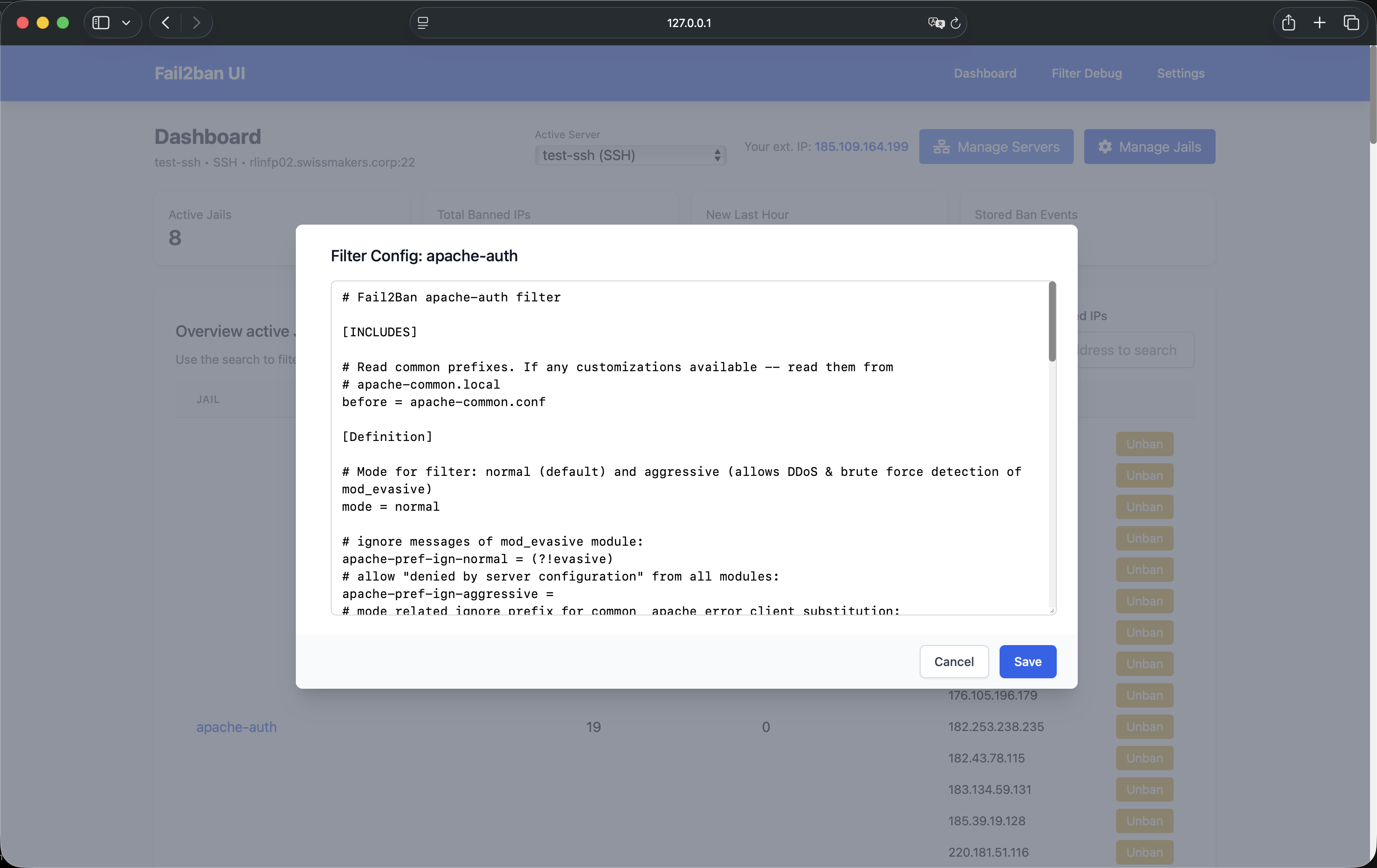
### Configuration Editor
Edit Fail2Ban jail and filter configurations (with syntax highlighting - planned) and validation.
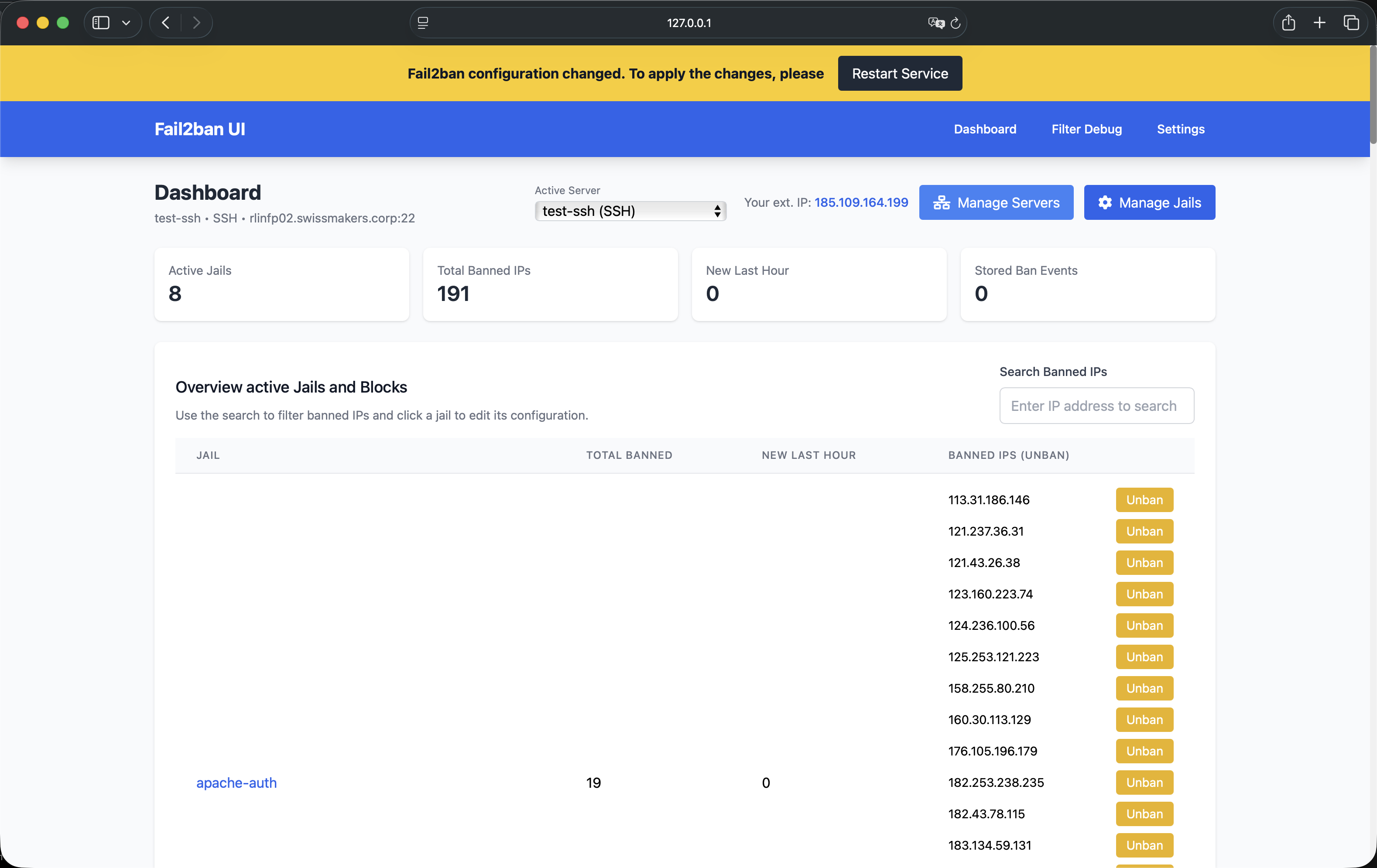
### Service Management
Reload or restart Fail2Ban services when needed, with integrated change detection.
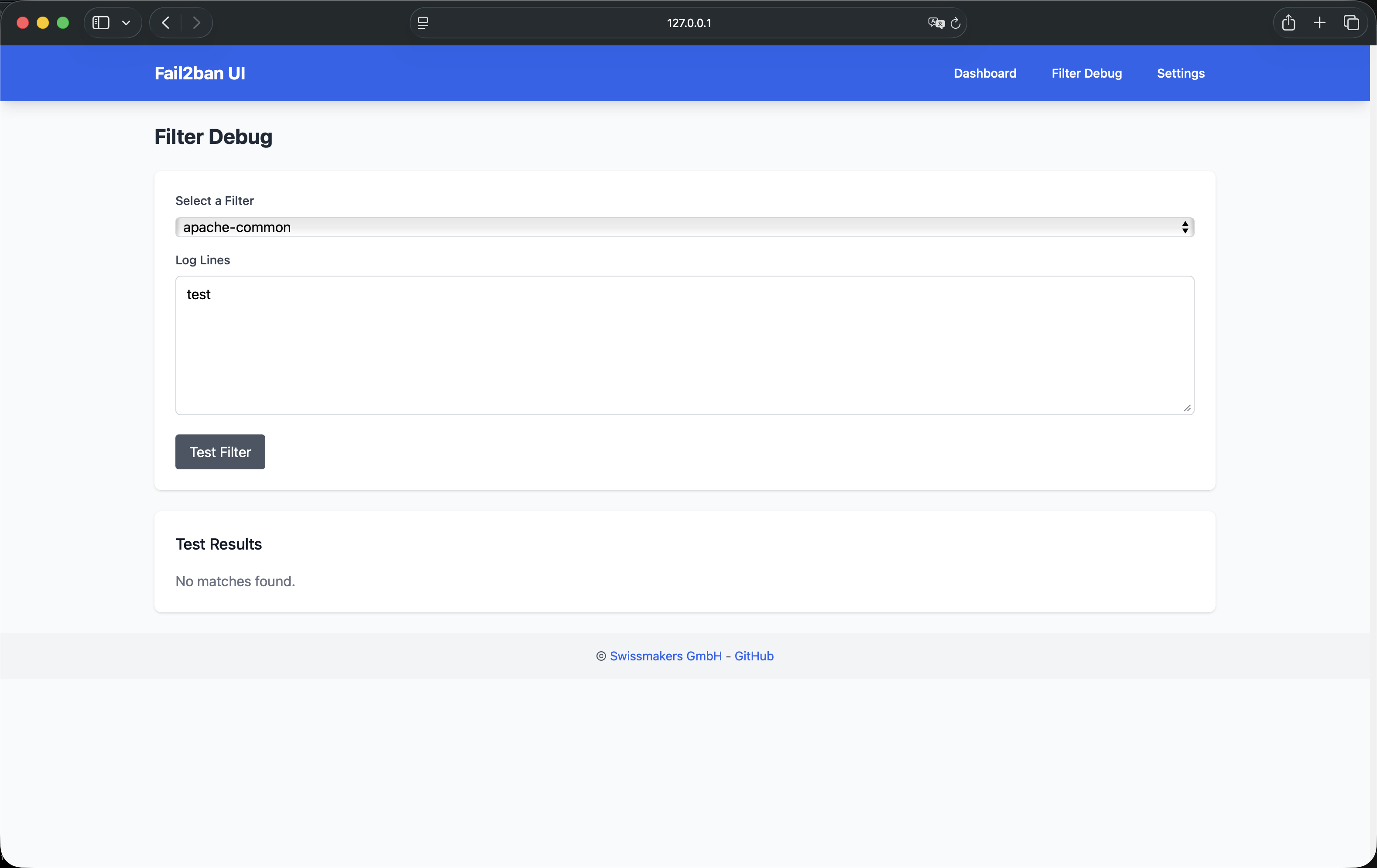
### Filter Debugging
Test and validate Fail2Ban filters using `fail2ban-regex`.
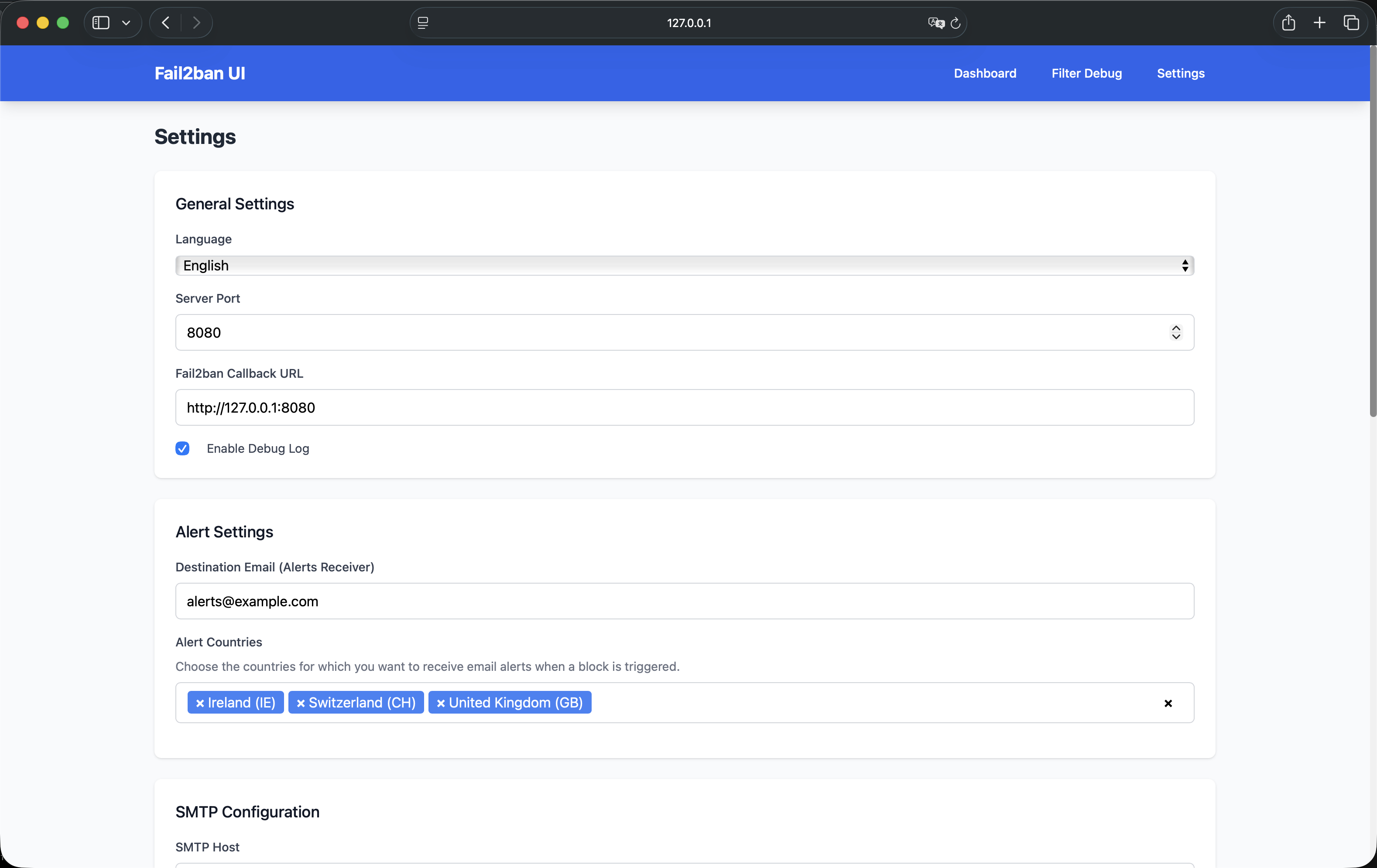
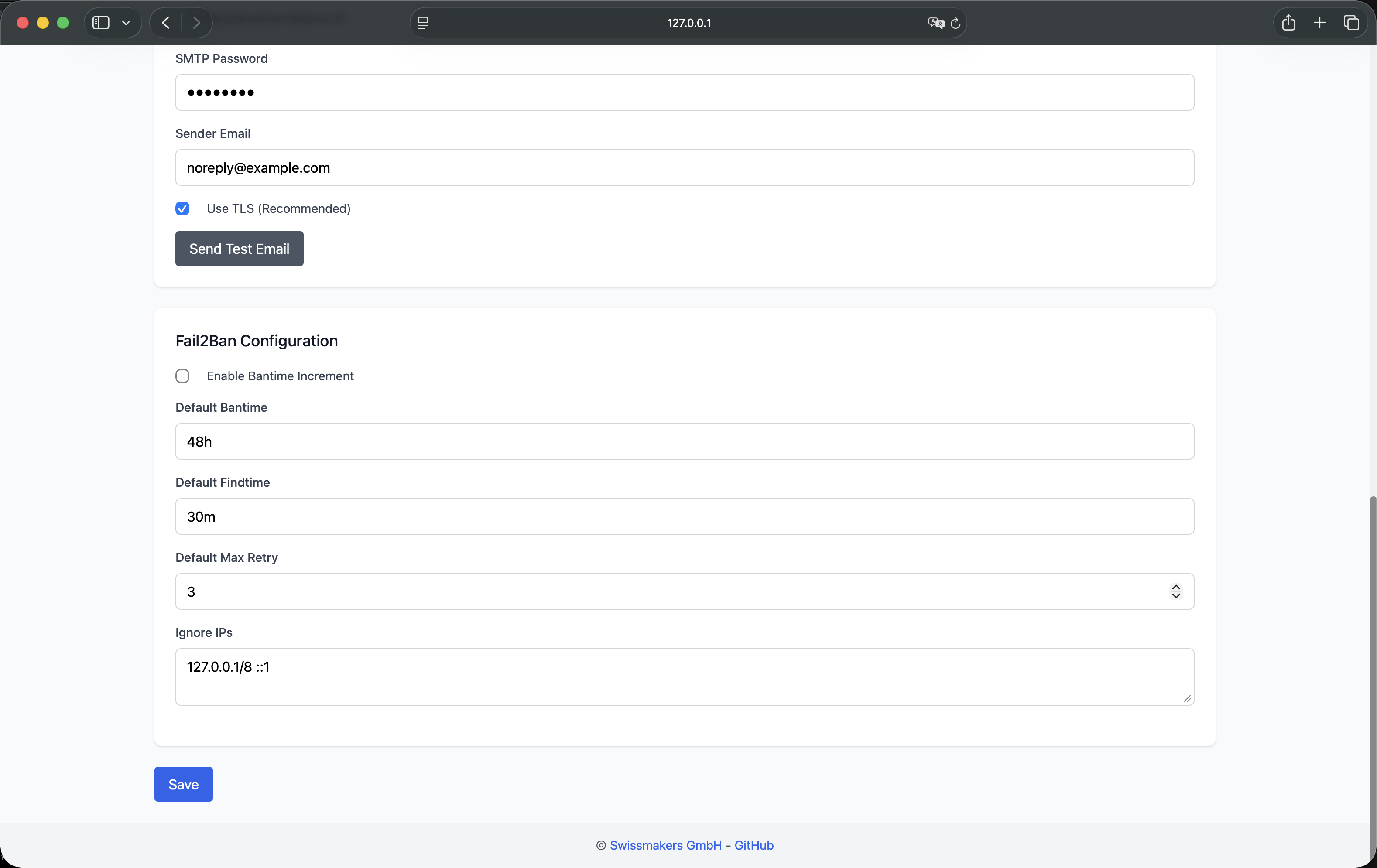
### Settings and Configuration
Comprehensive settings management for alerts, advanced banning, and system preferences.
---
## 🏗️ Architecture
### System Components
```
┌────────────────────────────────────────────────────────────┐
│ Fail2Ban UI Web Interface │
│ ┌──────────────┐ ┌──────────────┐ ┌──────────────┐ │
│ │ Dashboard │ │ Management │ │ Settings │ │
│ └──────────────┘ └──────────────┘ └──────────────┘ │
└────────────────────────────────────────────────────────────┘
│
▼
┌────────────────────────────────────────────────────────────────┐
│ Go Backend API Server │
│ ┌─────────────────────────────┐ ┌──────────────────────┐ │
│ │ Fail2Ban UI (Backend) │--->│ Send Alerts via Mail │ │
│ │ - Gin handlers + REST API │ │ (planned: Elastic) │ │
│ │ - Vanilla JS + Tailwind UI │ └──────────────────────┘ │
│ ->│ - SQLite storage │ │
│ │ └──────────────┬──────────────┘ │
│ │ │ │
│ │ ┌──────────┴────────────┐ ┌─────────────────────┐ │
│ │ │ Connector Manager and │-------│ Integrations │ │
│ │ │ handlers / actions │ │ Mikrotik / pfSense │ │
│ │ └────────────────────┬──┘ └─────────────────────┘ │
│ │ │ │
└─│───────────────────────────│──────────────────────────────────┘
│ │
│ ▼
┌─│─────────────────────────────────────────────────────────────┐
│ │ Connection to remote Server │
│ │ ───────────────────────────── │
│ │ │ │ │ │
│ │ ▼ ▼ ▼ │
│ │ ┌────────┐ ┌────────┐ ┌────────┐ │
│ │ │ Local │ │ SSH │ │ API │ │
│ │ │ Server │ │ Server │ │ Agent │ │
│ │ └────────┘ └────────┘ └────────┘ │
│ │ │ │ │ │
│ │ │ │ │ │
│ │ ┌─────┴─────────────┴─────────────┴─────┐ │
│ │ │ Fail2Ban instances on Reverse Proxies │ │
│ │ │ or remote / local Webserver │ │
│ │ └─────────────┬─────────────────────────┘ │
│ │ │ │
│ │ ┌──────────┴────────────┐ │
│ │ │ Report Alerts back to │ │
│ <----------│ Fail2Ban-UI REST with │ │
│ │ custom action │ │
│ └───────────────────────┘ │
└───────────────────────────────────────────────────────────────┘
```
### Technology Stack
- **Backend**: Go 1.21+ (Golang)
- **Frontend**: Vanilla JavaScript, Tailwind CSS
- **Database**: SQLite (embedded)
- **Container Runtime**: Podman/Docker compatible
- **Service Management**: systemd
- **Security**: SELinux compatible
---
## 🚀 Quick Start
### Prerequisites
- **Operating System**: Linux (RHEL 8+, Ubuntu 20.04+, Debian 11+, or containerized)
- **Fail2Ban**: At least version 0.10+ installed and configured
- **Go**: Version 1.21+ (only for source builds)
- **Node.js**: Version 16+ (for Tailwind CSS builds)
- **Permissions**: Root access to configure FACL and sudo-rules and Fail2Ban socket access
### Installation Methods
#### Method 1: Container Deployment (Recommended for Production)
**Option A: Using Pre-built Image**
Pull and run the official image:
```bash
# Pull the image
podman pull registry.swissmakers.ch/infra/fail2ban-ui:latest
# or with Docker:
docker pull registry.swissmakers.ch/infra/fail2ban-ui:latest
# Run the container
podman run -d \
--name fail2ban-ui \
--network=host \
-v /opt/podman-fail2ban-ui:/config:Z \
-v /etc/fail2ban:/etc/fail2ban:Z \
-v /var/log:/var/log:ro \
-v /var/run/fail2ban:/var/run/fail2ban \
-v /usr/share/GeoIP:/usr/share/GeoIP:ro \
registry.swissmakers.ch/infra/fail2ban-ui:latest
```
**Option B: Build from Source**
Build your own container image:
```bash
# Clone the repository
git clone https://github.com/swissmakers/fail2ban-ui.git
cd fail2ban-ui
# Build the image
sudo podman build -t fail2ban-ui:latest .
# or with Docker:
sudo docker build -t fail2ban-ui:latest .
# Run the container
sudo podman run -d \
--name fail2ban-ui \
--network=host \
-v /opt/podman-fail2ban-ui:/config:Z \
-v /etc/fail2ban:/etc/fail2ban:Z \
-v /var/log:/var/log:ro \
-v /var/run/fail2ban:/var/run/fail2ban \
-v /usr/share/GeoIP:/usr/share/GeoIP:ro \
fail2ban-ui:latest
```
**Option C: Using Docker Compose**
For easier management, use Docker Compose:
```bash
# Copy the example file
cp docker-compose.example.yml docker-compose.yml
# Edit docker-compose.yml to customize (e.g., change PORT)
# Then start:
docker-compose up -d
```
**Custom Port Configuration**
Change the default port (8080) using the `PORT` environment variable:
```bash
podman run -d \
--name fail2ban-ui \
--network=host \
-e PORT=3080 \
-v /opt/podman-fail2ban-ui:/config:Z \
-v /etc/fail2ban:/etc/fail2ban:Z \
-v /var/log:/var/log:ro \
-v /var/run/fail2ban:/var/run/fail2ban \
-v /usr/share/GeoIP:/usr/share/GeoIP:ro \
registry.swissmakers.ch/infra/fail2ban-ui:latest
```
Access the web interface at `http://localhost3080`.
**Volume Mounts Explained**
| Volume | Required | Purpose |
|--------|----------|---------|
| `/config` | ✅ Yes | Stores SQLite database, application settings, and SSH keys for remote connections |
| `/etc/fail2ban` | ✅ Yes* | Access to Fail2Ban configuration files (jails, filters, actions) |
| `/var/run/fail2ban` | ✅ Yes* | Access to Fail2Ban control socket for local management |
| `/var/log` | ⚠️ Optional | Read-only access to system logs for filter testing |
| `/usr/share/GeoIP` | ⚠️ Optional | Read-only access to GeoIP databases for geographic analysis |
*Required only if managing a local Fail2Ban instance. Not needed for remote-only deployments.
**📖 [Complete Container Deployment Guide](./deployment/container/README.md)** - Detailed documentation including volume descriptions, SELinux configuration, and troubleshooting.
#### Method 2: Systemd Service (Standalone)
**Clone and build:**
```bash
git clone https://github.com/swissmakers/fail2ban-ui.git /opt/fail2ban-ui
cd /opt/fail2ban-ui
# Build Tailwind CSS (optional, for offline use)
./build-tailwind.sh
# Build Go application
go build -o fail2ban-ui ./cmd/server/main.go
```
**📖 [Complete Systemd Setup Guide](./deployment/systemd/README.md)**
### First Launch
1. **Access the Web Interface**
- Navigate to `http://localhost:8080` (or your configured port)
- Default port: `8080` (configurable via `PORT` environment variable or in UI settings)
2. **Add Your First Server**
- **Local Server**: Enable the local connector if Fail2Ban runs on the same host
- **Remote Server**: Add via SSH or API agent connection
3. **Configure Settings**
- Set up email alerts (optional)
- Configure language preferences
- Adjust security settings
---
## 📚 Documentation
### Deployment Guides
- **[Container Deployment Guide](./deployment/container/README.md)**:
- Building container images from source
- Running containers with Docker/Podman
- Volume mount explanations (required vs optional)
- Custom port configuration via `PORT` environment variable
- Docker Compose examples
- SELinux configuration
- Troubleshooting common issues
- **[Systemd Service Setup](./deployment/systemd/README.md)**: Standalone installation and service configuration for non-containerized deployments
- **[SELinux Configuration](./deployment/container/SELinux/)**: Security policies for SELinux-enabled systems
### Configuration
#### Fail2Ban Callback URL
The **Fail2Ban Callback URL** is a critical setting that determines how Fail2Ban instances send ban alerts back to Fail2Ban UI. This URL is embedded in a custom Fail2Ban action file that gets deployed to all managed Fail2Ban instances (local, SSH, and API agent connections).
**How it works:**
- When a Fail2Ban instance bans an IP, it executes the custom action which sends a POST request to the callback URL (`/api/ban` endpoint)
- Fail2Ban UI receives these notifications and stores them in the database for monitoring and analysis
- The callback URL is automatically synchronized with the server port when using the default localhost pattern
**Configuration Guidelines:**
1. **Local Deployments:**
- Use the same port as Fail2Ban UI: `http://127.0.0.1:8080` (or your configured port)
- The callback URL automatically updates when you change the server port
- Example: If Fail2Ban UI runs on port `3080`, use `http://127.0.0.1:3080`
2. **Reverse Proxy Setups:**
- Use your TLS-encrypted endpoint: `https://fail2ban.example.com`
- Ensure the reverse proxy forwards requests to the correct Fail2Ban UI port
- The callback URL must be accessible from all Fail2Ban instances (local and remote)
3. **Port Changes:**
- When you change the Fail2Ban UI port (via `PORT` environment variable or UI settings), the callback URL automatically updates if it's using the default localhost pattern
- For custom callback URLs (e.g., reverse proxy or custom IP), you must manually update them to match your setup
**Important Notes:**
- The callback URL must be accessible from all Fail2Ban instances that need to send alerts
- For remote Fail2Ban instances, ensure network connectivity to the callback URL
- If using a reverse proxy, configure it to forward `/api/ban` requests to Fail2Ban UI
- The callback URL is stored in `/etc/fail2ban/action.d/ui-custom-action.conf` on each managed Fail2Ban instance
#### Adding a Local Server
The local connector allows managing Fail2Ban on the same host where Fail2Ban UI runs.
**Requirements:**
- Fail2Ban installed and running
- Special FACL Rules and passwordless sudo to `/usr/bin/fail2ban-client`
- Socket access: `/var/run/fail2ban/fail2ban.sock`
**Enable in UI:**
1. Navigate to **Settings** → **Manage Servers**
2. Enable **Local Connector**
3. Test connection to verify access
#### Adding an SSH Server
Connect to remote Fail2Ban instances via SSH for centralized management.
**Prerequisites:**
- SSH key-based authentication (passwordless login)
- Network connectivity from UI host to remote server
- Service account with appropriate permissions
**Recommended Service Account Setup:**
```bash
# Create dedicated service account
sudo useradd -r -s /bin/bash sa_fail2ban
# Configure sudoers for Fail2Ban operations
sudo visudo -f /etc/sudoers.d/fail2ban-ui
```
Add the following sudoers configuration:
```
sa_fail2ban ALL=(ALL) NOPASSWD: /usr/bin/fail2ban-client *
sa_fail2ban ALL=(ALL) NOPASSWD: /usr/bin/systemctl restart fail2ban
```
**Set file system ACLs:**
```bash
# Grant read/write access to Fail2Ban configuration directory
sudo setfacl -Rm u:sa_fail2ban:rwX /etc/fail2ban
sudo setfacl -dRm u:sa_fail2ban:rwX /etc/fail2ban
```
**Add Server in UI:**
1. Navigate to **Settings** → **Manage Servers**
2. Click **Add Server**
3. Select **SSH** connection type
4. Configure:
- **Name**: Descriptive server identifier
- **Host**: IP address or hostname
- **Port**: SSH port (default: 22)
- **SSH User**: Service account username
- **SSH Key**: Select from `~/.ssh/` directory
5. Click **Test Connection** to verify
6. Save configuration
**Security Benefits:**
- Least privilege access model
- No full sudo access required
- Fine-grained file system permissions
- Audit trail via sudo logs
---
### 🔒 Security Notes
#### Network Security Best Practices
- **Reverse Proxy**: Use nginx or Apache as reverse proxy with SSL/TLS termination to secure the Fail2ban-UI
- **VPN Access**: Require VPN connection for access to Fail2Banu-UI only
- **IP Whitelisting**: Restrict access to specific IPs / ranges e.g. internal IT
#### Authentication and Authorization
- **SSH Key Management**: Use strong SSH keys like 4096-bit RSA or even better Ed25519. When using RSA no smaler bit size please.
- **Service Accounts**: Use dedicated service accounts, not personal accounts
- **Sudoers Configuration**: Minimal sudo permissions, no passwordless full sudo
#### Data Protection
- **Database Permissions**: Restrict SQLite database file permissions (600)
- **Log Files**: Secure log file access and don't forget to setup a rotation
- **Backup Encryption**: It's always a good idea, to encrypt backups of configuration and database files
#### SELinux Configuration
For SELinux-enabled systems, apply the required policies:
```bash
# Basic rule to allow Fail2Ban to access the UI API
semodule -i fail2ban-curl-allow.pp
# Container deployment policies
semodule -i fail2ban-container-ui.pp
semodule -i fail2ban-container-client.pp
```
**📖 [SELinux Policies Documentation](./deployment/container/SELinux/)**
---
### 🗄️ Database Notes
#### SQLite Database Schema
Fail2Ban UI uses an embedded SQLite database (`fail2ban-ui.db`) for persistent storage:
**Tables:**
- **`servers`**: Server configurations (local, SSH, API agent)
- **`app_settings`**: Application preferences and settings of Fail2Ban-UI
- **`ban_events`**: Historical ban records with full context
- **`permanent_blocks`**: Permanent block records for integrations
**Data Retention:**
- Ban events are stored indefinitely (configurable)
- Automatic database migrations on version updates
- Backup recommended before major updates
---
### 🌍 Internationalization Notes
#### Currently Supported Languages
- **English** (en) - Default
- **German** (de, de_CH) - Standard and Swiss variants
- **French** (fr)
- **Italian** (it)
- **Spanish** (es)
#### Adding New Languages
1. Create translation file: `internal/locales/{language_code}.json`
2. Copy structure from `internal/locales/en.json`
3. Translate all key-value pairs
4. Test in UI: **Settings** → **Language** → Select new language
**Translation File Structure:**
```json
{
"page.title": "Fail2ban UI Dashboard",
"nav.dashboard": "Dashboard",
"nav.settings": "Settings",
...
}
```
---
### 📊 API Reference
Fail2Ban UI provides a RESTful API for programmatic access:
#### Endpoints
**Server Management:**
- `GET /api/servers` - List all configured servers
- `POST /api/servers` - Add or update server
- `DELETE /api/servers/:id` - Remove server
- `POST /api/servers/:id/test` - Test server connection
**Jail Management:**
- `GET /api/summary` - Get summary of all jails
- `POST /api/jails/:jail/unban/:ip` - Unban IP address
- `GET /api/jails/manage` - List jail management status
- `POST /api/jails/manage` - Update jail enabled states
**Configuration:**
- `GET /api/jails/:jail/config` - Get jail/filter configuration
- `POST /api/jails/:jail/config` - Update jail/filter configuration
**Events and Analytics:**
- `GET /api/events/bans` - List ban events
- `GET /api/events/bans/stats` - Get ban statistics
- `GET /api/events/bans/insights` - Get ban insights and analytics
**Settings:**
- `GET /api/settings` - Get application settings
- `POST /api/settings` - Update application settings
- `POST /api/settings/test-email` - Test email configuration
**Filter Debugging:**
- `GET /api/filters` - List available filters
- `POST /api/filters/test` - Test filter against log lines
**Service Control:**
- `POST /api/fail2ban/restart` - Restart Fail2Ban service
**Notifications:**
- `POST /api/ban` - Receive ban notification from Fail2Ban
---
## 🛠️ Troubleshooting
### Common Issues
#### UI Not Accessible
**Symptoms:** Cannot access web interface
**Solution / Check:**
```bash
# Check if service is running
systemctl status fail2ban-ui
# Check firewall rules
sudo firewall-cmd --list-ports
sudo firewall-cmd --add-port=8080/tcp --permanent
sudo firewall-cmd --reload
# Check logs
journalctl -u fail2ban-ui.service -f
```
#### No Servers Configured
**Symptoms:** Empty dashboard, no servers visible
**Solution / Check:**
1. Navigate to **Settings** → **Manage Servers**
2. Enable **Local Connector** (if Fail2Ban runs locally)
3. Add remote server via SSH or API agent
4. Verify server connection status
#### SSH Connection Issues
**Symptoms:** Cannot connect to remote server
**Solution / Check:**
```bash
# Test SSH connection manually
ssh -i ~/.ssh/your_key user@remote-host
# Verify SSH user permissions
sudo -l -U sa_fail2ban
# Check ACLs on /etc/fail2ban
getfacl /etc/fail2ban
# Enable debug mode in UI settings for detailed error messages
```
#### Local Connector Not Working
**Symptoms:** Local server shows as disconnected
**Solution / Check:**
```bash
# Verify Fail2Ban is running
sudo systemctl status fail2ban
# Check socket permissions
ls -la /var/run/fail2ban/fail2ban.sock
# Verify UI has access (runs as root or has sudo permissions)
sudo fail2ban-client status
```
#### Database Errors
**Symptoms:** Database-related errors in logs
**Solution / Check:**
```bash
# Check database file permissions
ls -la /opt/fail2ban-ui/fail2ban-ui.db
# Verify database integrity
sqlite3 /opt/fail2ban-ui/fail2ban-ui.db "PRAGMA integrity_check;"
# Backup and recreate if corrupted
cp fail2ban-ui.db fail2ban-ui.db.backup
```
---
## 🤝 Contributing
We welcome contributions from the community! Whether it's bug fixes, feature enhancements, or documentation improvements, your contributions help make Fail2Ban UI better for everyone.
### How to Contribute
1. **Fork the Repository**
```bash
git clone https://github.com/swissmakers/fail2ban-ui.git
cd fail2ban-ui
```
2. **Create a Feature Branch**
```bash
git checkout -b feature/your-feature-name
```
3. **Make Your Changes**
- Follow Go coding standards
- Add tests for new features
- Update documentation as needed
4. **Commit Your Changes**
```bash
git commit -m "Add: Description of your feature"
```
5. **Push and Create Pull Request**
```bash
git push origin feature/your-feature-name
```
### Contribution Guidelines
- **Code Style**: Follow Go standard formatting (`gofmt`)
- **Testing**: Test your changes thoroughly
- **Documentation**: Update README and inline documentation
- **Commit Messages**: Use clear, descriptive commit messages
- **Pull Requests**: Provide detailed description of changes
---
## 📜 License
Fail2Ban UI is licensed under the **GNU General Public License v3.0 (GPL-3.0)**.
This means:
- ✅ **Free to use** in commercial and non-commercial projects
- ✅ **Free to modify** and distribute
- ✅ **Source code available** for inspection and auditing
- ⚠️ **Copyleft**: Modifications must be released under the same license
**Full License Text:** [LICENSE](./LICENSE)
---
## 🏢 Enterprise Support
### Professional Services
**Swissmakers GmbH** offers professional services for Fail2Ban UI:
- **Enterprise Deployment**: Custom deployment and configuration
- **Training and Support**: On-site or remote training sessions
- **Custom Development**: Feature development and integrations
- **Security Audits**: Security assessment and hardening
**Contact:** [https://swissmakers.ch](https://swissmakers.ch)
### Community Support
- **GitHub Issues**: [Report bugs and request features](https://github.com/swissmakers/fail2ban-ui/issues)
- **Documentation**: Comprehensive guides and API reference
- **Community**: Join discussions and share experiences
---
## 🙏 Acknowledgments
Fail2Ban UI is built on the foundation of the excellent [Fail2Ban](https://www.fail2ban.org/) project and the open-source community.
**Special Thanks:**
- Fail2Ban developers and contributors
- Go community and ecosystem
- All contributors and users of Fail2Ban UI
---
**Fail2Ban UI** — *Enterprise-Grade Intrusion Detection System Management*